
Title Tag and Meta Description: A Simple Guide for 2026
Your title tag and meta description are the first things a person sees about your page. They show up in Google before anyone visits your site. If they are dull, vague, or cut off, people scroll past you, even if your page is great. This guide explains what each one is, how to write them, and what mistakes to avoid. It is written for founders and small teams who want clear steps, not theory.
In this guide
- 1.What Is a Title Tag?
- 2.What Is a Meta Description?
- 3.Title Tag vs. Meta Description at a Glance
- 4.How to Write a Great Title Tag
- 5.4. Give each page its own title
- 6.How to Write a Great Meta Description
- 7.A Real-World Example
- 8.Pros and Cons of Writing Your Own Meta Descriptions
- 9.Common Mistakes to Avoid
- 10.What If Google Rewrites Your Title or Description?
- 11.How to Check and Improve Your Results
- 12.Quick Checklist
- 13.Frequently Asked Questions
- 14.Final Thoughts
What Is a Title Tag?
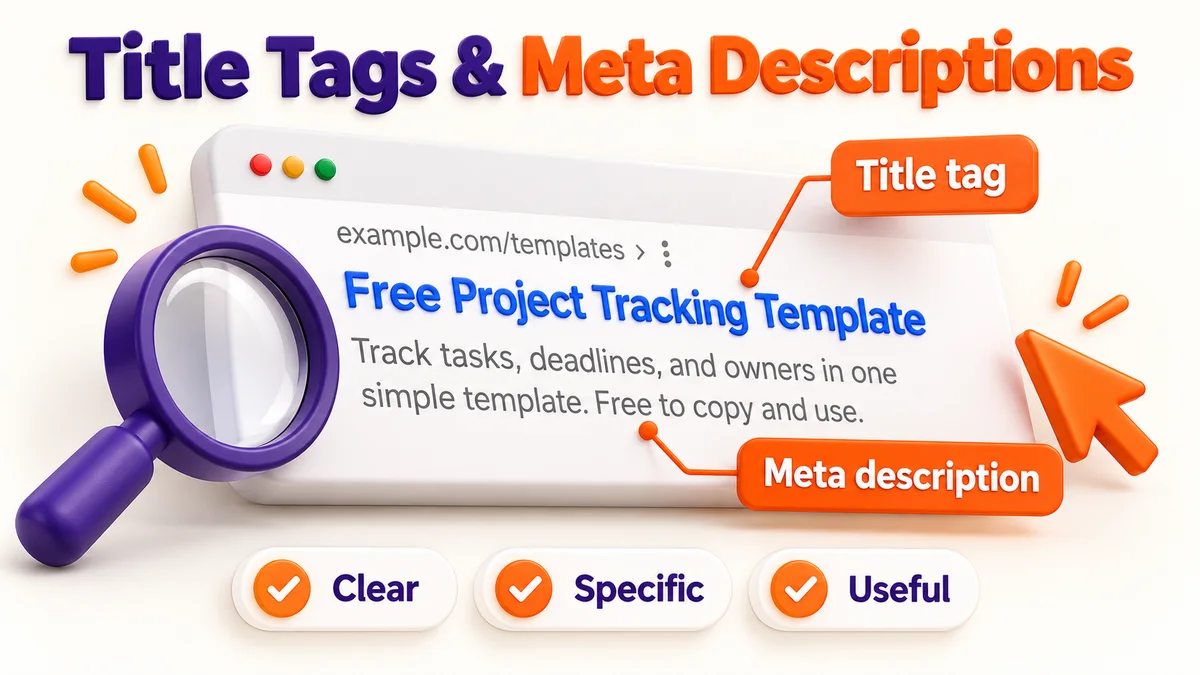
A title tag is a short line of HTML in your page's code. It tells search engines and people what the page is about. It looks like this:
<title>Title Tag and Meta Description: A Simple Guide</title>
It shows up in three places:
- Search results: the blue clickable headline
- Browser tabs: the small label at the top of the browser
- Social shares: often used as the default title when someone shares your link
The title tag is not the same as your H1. The H1 is the big heading on the page. The title tag is the headline in search results. They can be similar, but they do not have to match.
What Is a Meta Description?
A meta description is a short summary of the page, also written in HTML:
<meta name="description" content="Learn how to write title tags and meta descriptions that get more clicks. Simple rules, examples, and a checklist.">
It usually appears as the gray text under the blue headline in search results.
Google has said meta descriptions are not a direct ranking factor. So why do they matter? Because they affect clicks. A clear, useful description can turn a searcher into a visitor. More clicks from the same ranking spot means more traffic without moving up a single position.
Title Tag vs. Meta Description at a Glance
| Title Tag | Meta Description | |
|---|---|---|
| Main job | Tell people and search engines what the page is about | Convince people to click |
| Ranking signal? | Yes, a light but real signal | No, not directly |
| Where it shows | Search results, browser tab, social shares | Search results (under the title) |
| Best length | About 50–60 characters | About 130–160 characters |
| Keyword use | Put the main keyword near the front | Use the keyword naturally |
| Tone | Clear and specific | Helpful, with a reason to click |
| Can Google rewrite it? | Yes, fairly often | Yes, very often |
Note that Google actually cuts titles by pixel width (roughly 600 pixels), not by character count. Wide letters like "W" and "M" take more space than "i" or "l". Use the character numbers as a guide, not a strict rule.
How to Write a Great Title Tag
1. Put your main keyword near the front
If people search for "[directory submission service](/)," those words should appear early in the title. Words at the start carry more weight and are less likely to be cut off.
2. Keep it under about 60 characters
This helps the full title show up without "..." at the end. Check it in a SERP preview tool before you publish.
3. Make it specific
Vague titles get ignored. Compare these:
| Weak title | Stronger title |
|---|---|
| Our Services | Manual Directory Submission Service for Startups |
| Blog Post About SEO | Startup SEO Strategy: A Practical Guide for Founders |
| Home | Project Management Software for Small Teams |
4. Give each page its own title
Never use the same title on many pages. Duplicate titles confuse search engines about which page to show. They also make your results look the same, so people have no reason to pick one over another.
5. Add a reason to click (when it fits)
Words like "Guide," "Checklist," "Examples," "Step-by-Step," or a year can help. Only use them if they are true. A "2026 Guide" that was last touched in 2021 hurts trust.
6. Add your brand at the end (optional)
A common pattern is: Main Topic | Brand Name. Brand names help with trust and recognition, but they use up space. If your title is already long, drop the brand.
How to Write a Great Meta Description
1. Treat it like a tiny ad
You have about two lines. Say what the page offers and why it is worth a click.
2. Aim for 130–160 characters
Google may show more or less depending on the search and device. Put the most important part first so a cut-off does not hide it.
3. Use the keyword naturally
Google bolds words in the description that match the search. That makes your result stand out. But do not stuff keywords. It reads badly and does not help.
4. Speak to the reader
Use simple, direct words. "You" works well. Answer the question in their head: What will I get from this page?
5. End with a light call to action
Phrases like "Learn how," "See examples," or "Compare options" give people a clear next step. Skip pushy phrases like "Click here now!!!"
6. Make each one unique
Just like titles, every page needs its own description. If you have a lot of pages, focus first on your most important ones: the homepage, service pages, and top blog posts.
A Real-World Example
Say you run a small SaaS tool that helps teams track projects, and you are writing the page for a "project tracking template."
Before:
- Title: Templates | Acme
- Description: Welcome to Acme. We offer many templates for your needs. Browse our site to learn more.
After:
- Title: Free Project Tracking Template for Small Teams | Acme
- Description: Track tasks, deadlines, and owners in one simple template. Free to copy and use. See how small teams stay on schedule with Acme.
Why the second one wins:
- The title says exactly what the page is (a free project tracking template) and who it is for (small teams).
- The description lists what the reader gets and includes a small reason to click ("free to copy").
- Both are written in plain words with no filler.
Pros and Cons of Writing Your Own Meta Descriptions
You do not have to write meta descriptions. Google will make one from your page text if you leave it blank. Here is the trade-off:
| Pros of writing your own | Cons of writing your own |
|---|---|
| You control the message | It takes time on large sites |
| Can raise click-through rate | Google may still replace it |
| Lets you include a call to action | Needs updating when the page changes |
| Keeps your brand voice consistent | Easy to let go stale |
Simple rule: write them by hand for your most important pages. For huge sites, use templates for the rest, then improve the top performers over time.
Common Mistakes to Avoid
- Keyword stuffing. "Best SEO tool, SEO software, SEO services, cheap SEO" looks spammy and can be rewritten by Google.
- Duplicate titles and descriptions. Each page needs its own.
- Titles that are too long. The important part gets cut off.
- Clickbait that does not match the page. People leave fast, which hurts trust.
- Leaving them blank. You give up control of your first impression.
- Ignoring search intent. If people want a "how to" guide and your title looks like a sales page, they will skip it.
- Never checking results. You will not know what works unless you look at the data.
What If Google Rewrites Your Title or Description?
It happens, and it is normal. Google may swap in a different title or pull a line from your page if it thinks that fits the search better. This is more common when:
- The title is too long or too short
- The title is stuffed with keywords
- The description does not match what the person searched for
- The title has no clear link to the page content
You cannot fully stop it. But you can lower the odds by writing clear, honest titles that match the page and the search topic.
How to Check and Improve Your Results
- Open Google Search Console. Go to the Performance report and look at click-through rate (CTR) by page.
- Find pages with high impressions but low CTR. These rank well enough to be seen, but people are not clicking. That is where better titles and descriptions help most.
- Rewrite one at a time. Change the title or description, then wait a few weeks and compare.
- Use a SERP preview tool before publishing so you can see how it will look.
- Audit your whole site now and then. Crawling tools can flag missing, duplicate, or too-long titles and descriptions in minutes.
Note that this is the same kind of on-page cleanup that supports your off-page work. Once your pages have strong titles and descriptions, every backlink or directory listing you earn sends people to pages that are ready to earn the click. For example, [SubmitWell](/) submits your startup to relevant directories by hand, and those listings work best when the page they point to has a clear title and a description that makes a visitor want to stay.
Quick Checklist
- Main keyword is near the start of the title
- Title is about 50–60 characters
- Description is about 130–160 characters
- Every page has a unique title and description
- The wording matches what is actually on the page
- Description gives a reason to click
- No keyword stuffing
- Checked in Search Console after a few weeks
Frequently Asked Questions
Is the title tag a ranking factor?
Yes. It is a light but real signal that helps search engines understand your page. It matters even more for how people decide whether to click.
Is the meta description a ranking factor?
No, not directly. But a good one can raise your click-through rate, which brings more visitors from the same position.
How long should a title tag be?
About 50–60 characters is a safe range. Google actually cuts titles by pixel width, so treat the number as a guide.
How long should a meta description be?
Around 130–160 characters works well. Put the key message first in case it gets shortened.
Should I include my brand name in the title?
It helps with trust and recognition, especially on your homepage. If space is tight, put the topic first and drop the brand.
Why does Google show a different title or description than mine?
Google may rewrite them if it thinks another version fits the search better. Clear, honest, well-sized titles and descriptions are less likely to be changed.
Can I use the same meta description on many pages?
It is better not to. Duplicates make your results look the same and waste a chance to speak to each searcher. Write unique ones for your key pages.
How often should I update titles and descriptions?
Review them when a page changes, when traffic drops, or when Search Console shows low CTR on a page that ranks well. A yearly check of your top pages is a good habit.
Final Thoughts
Title tags and meta descriptions are small, but they sit at the exact moment someone decides whether to visit your site. Write them for people first: be clear, be specific, and be honest about what the page offers. Then use Search Console to see what works and improve from there.
Ready to Test yours? Try the title tag checker and meta description checker now
Make your startup easier to discover
SubmitWell handles manual directory submissions and provides a report with submitted links and screenshot proof, so you can focus on your product and website.
See Plans - Starting at $35Useful tools for this guide
Related Resources
Make your startup easier to discover
SubmitWell handles manual directory submissions and provides a report with submitted links and screenshot proof, so you can focus on your product and website.
See Plans & PricingOne-time payment. No subscription.